

Anime and J-drama immersion
Read every line with furigana instead of pausing to look up kanji. Miteiru keeps you in the scene while you pick up natural Japanese from shows you already watch.
Miteiru is a free, open-source desktop video player for Japanese, Mandarin, Cantonese, and Vietnamese — a Migaku alternative with furigana, pinyin, and jyutping on your subtitles, plus lookups, vocab colors, and Anki export. No account. No subscription.
Windows · macOS · Linux — no account, no paywall. Compare with Migaku
Japanese · furigana · romaji · meanings — hover a word
Real app footage, an original soundtrack, and every feature in under a minute.
Prefer YouTube? Watch it there.
No textbook voice. Just your media, with the readings and lookups baked in.
Read every line with furigana instead of pausing to look up kanji. Miteiru keeps you in the scene while you pick up natural Japanese from shows you already watch.
Pinyin appears above hanzi in real time so you connect pronunciation to characters. Dual subtitles let you stay in Mandarin while checking English when you need it.
Few tools overlay jyutping on Cantonese subtitles. Miteiru fills that gap for HK films, YouTube creators, and ripped media with your own .srt files.
Build cards from lines you hear in context. Learn mode tokenizes the sentence, adds readings, and exports a deck you can review the next day.
Miteiru is a free, open-source desktop player for people who would rather not rent their subtitle overlay. Honest split: files and YouTube here, Netflix in the browser there.
| Feature | Miteiru | Migaku |
|---|---|---|
| Price | Free to download and use. No trial clock. | Paid subscription after a short trial. Lifetime plan also sold. |
| What you watch | Local files (MP4, MKV, and other Chromium formats) and YouTube URLs. | Streaming sites in the browser (Netflix, YouTube, Disney+, Viki, and others). |
| Flashcards | Export words or sentences to Anki. | Built-in SRS, plus export options depending on the current plan. |
| Netflix / Disney+ / Viki | Not supported. | Core workflow. |
Real screenshots from the app. Scroll, and it walks you through.
Step 1
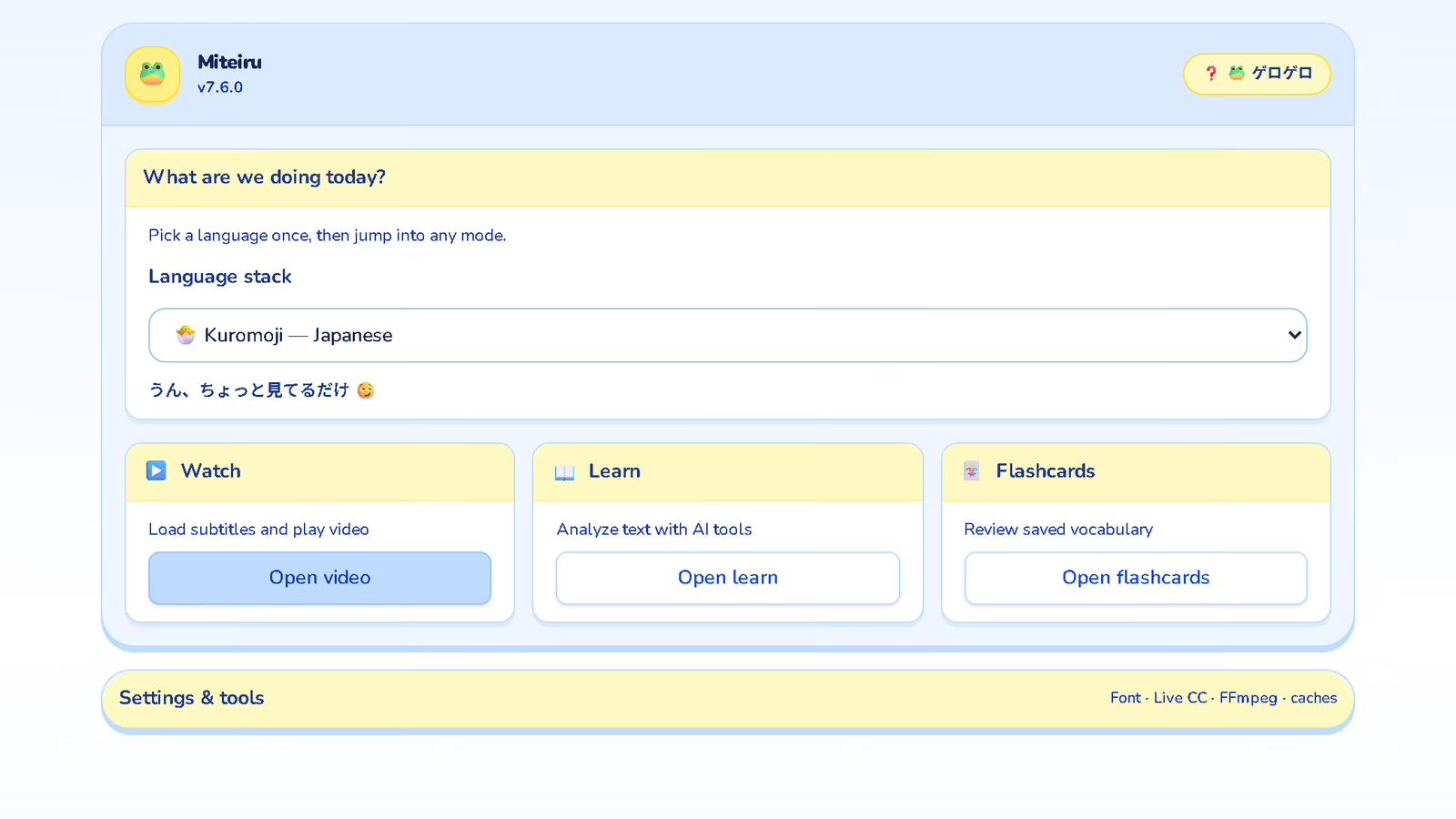
Step 2
show.en.srt sort themselves. HEVC or several audio tracks? It offers to remux or convert.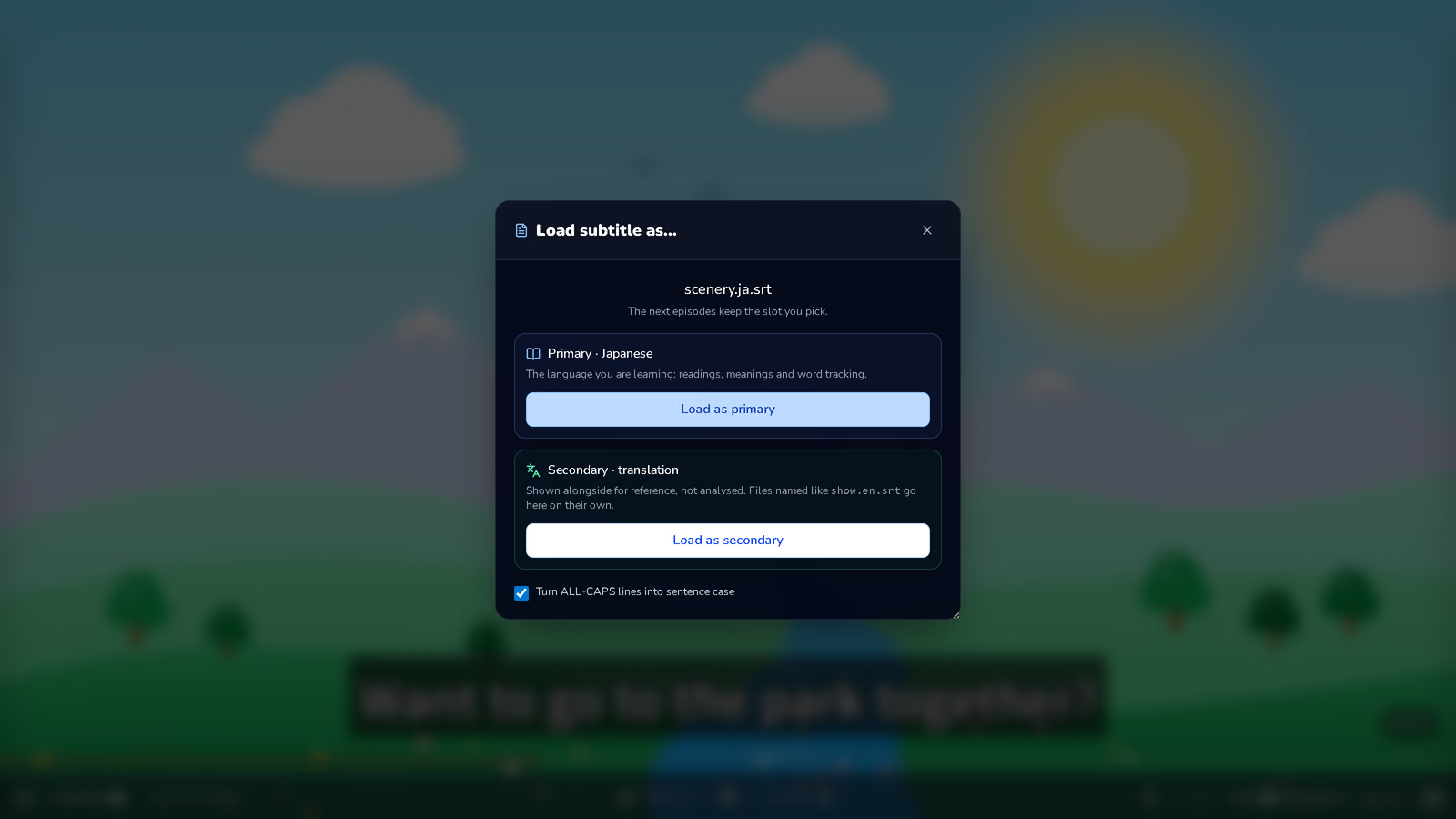
Step 3
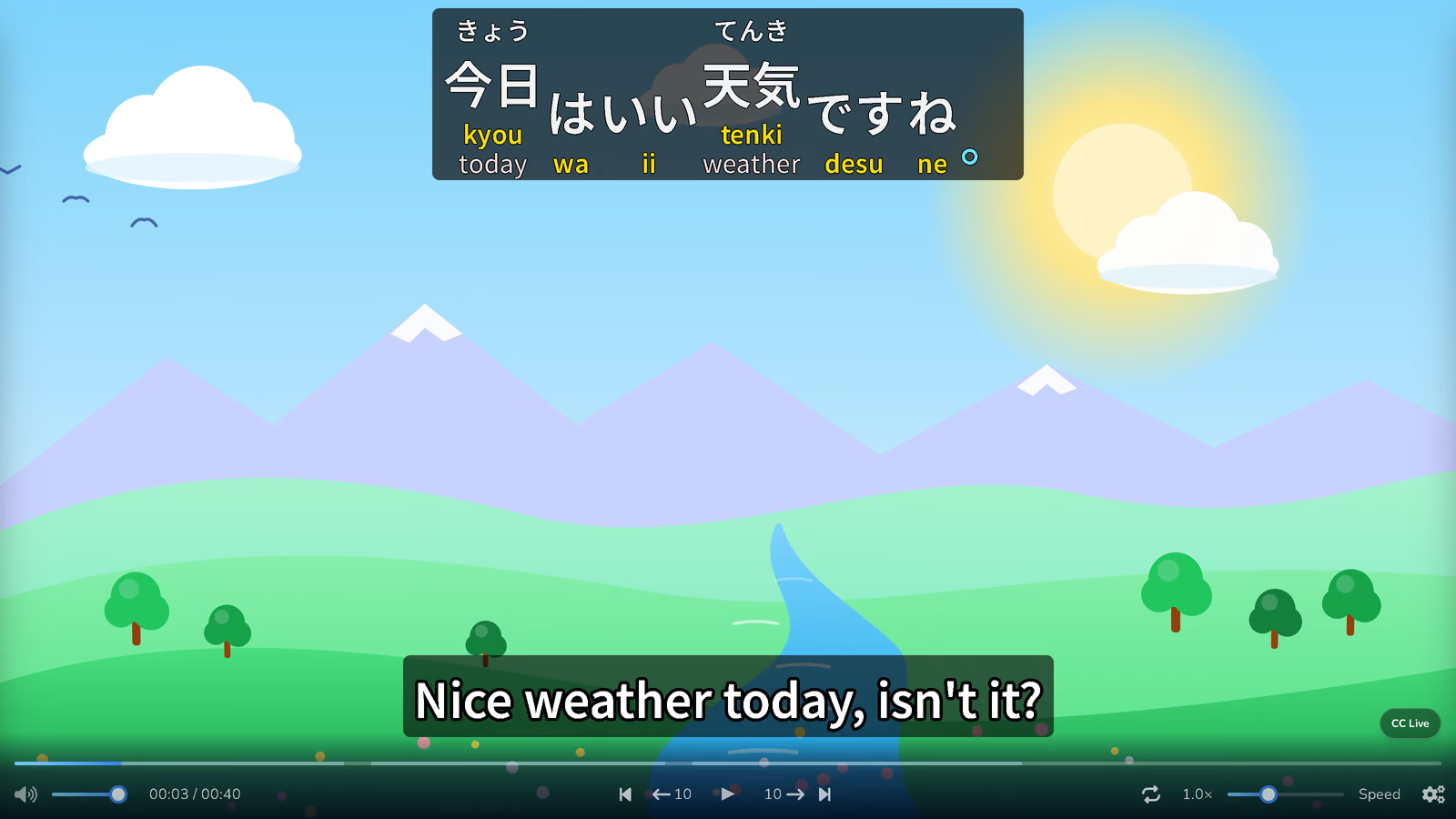
Step 4
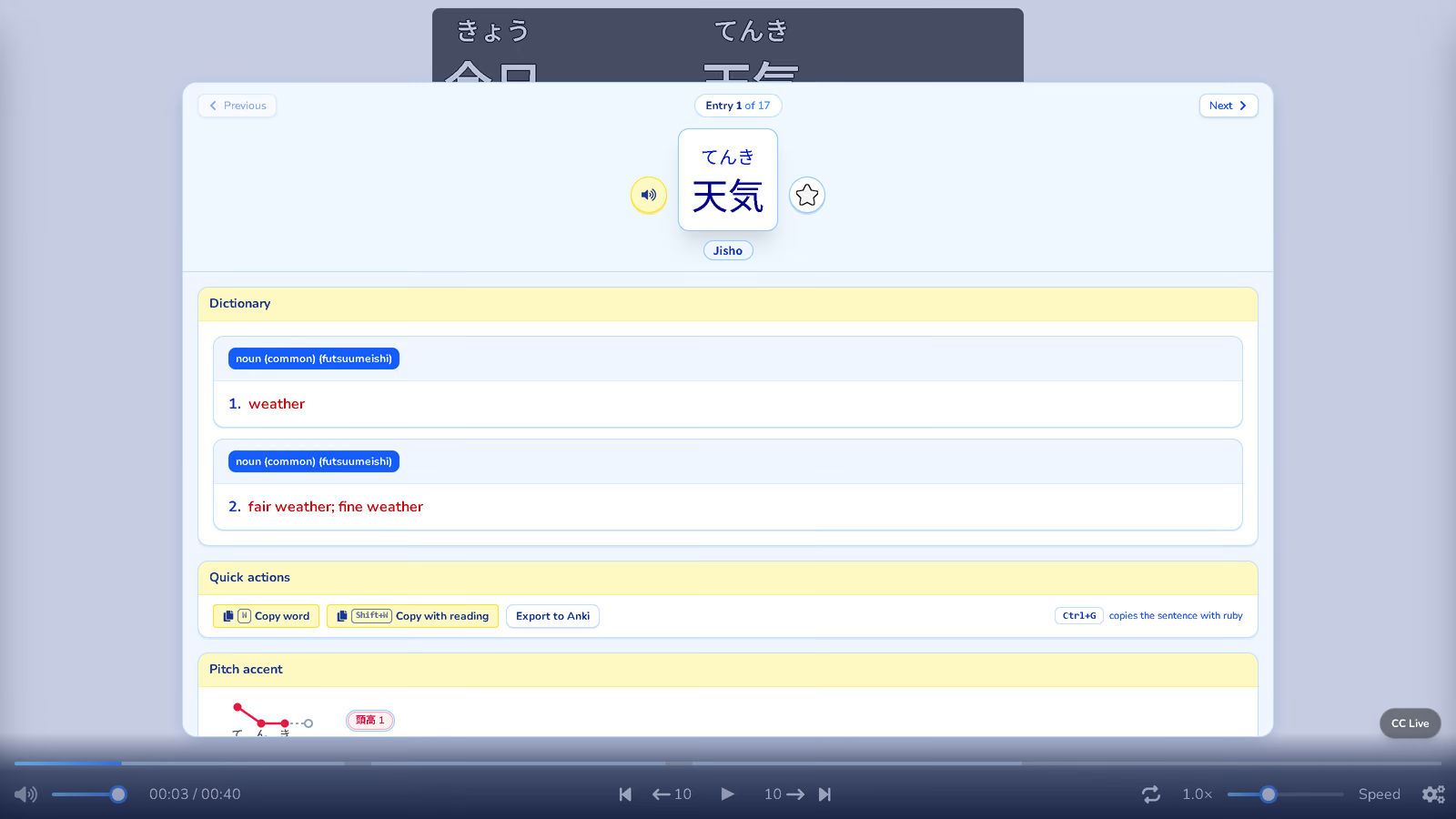
Step 5
Step 6
Not a passive player: a little study nook that shows up when you need it.
Windows, macOS, Linux. Local files work offline; paste a YouTube link for the rest.
Furigana, pinyin, or jyutping over every word, with short glosses underneath.
Click a word for its dictionary entry, pitch accent and your notes.
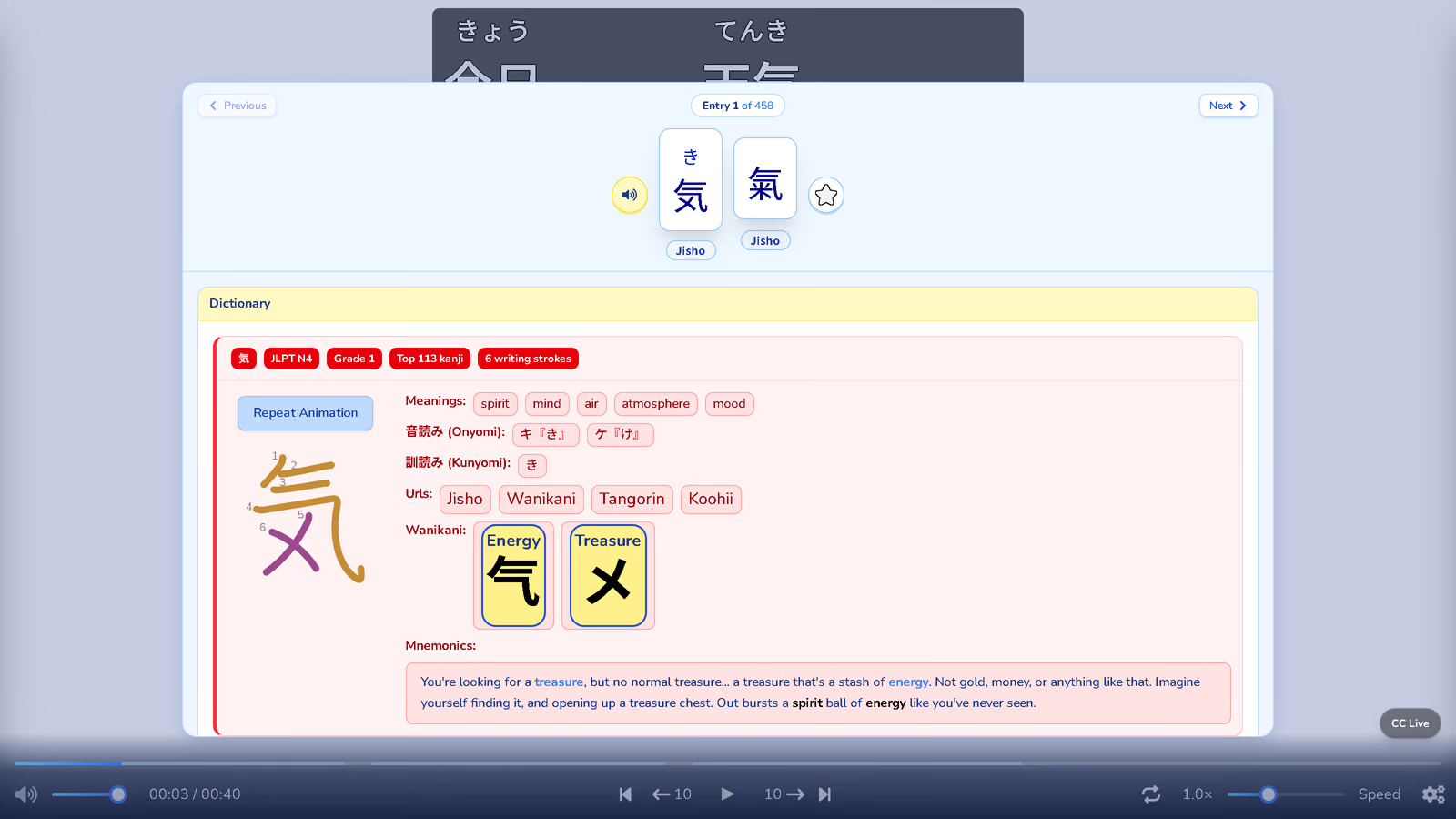
Stroke order, JLPT level, readings, radicals and a mnemonic for every kanji.
食べてしまいました stays one word and opens 食べる, with 15 forms and when to use them.
Target language on top, your translation underneath. *.en.srt files find their slot.
Mark how well you know a word; the subtitle colors it from then on.
Words you mark come back as flashcards, or go to Anki with readings and glosses.
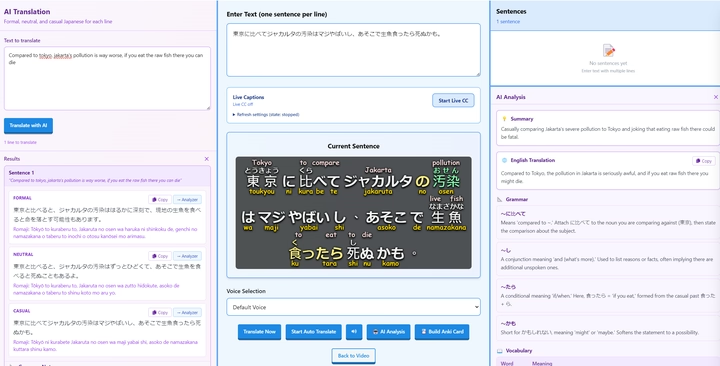
Formal, neutral or casual AI translations and grammar notes, with your own OpenRouter key.
Scrolling lyrics that follow the song, and LRCLIB lyrics search built in.
Every subtitle line is marked on the track. Hover to read one before you jump.
Captions of whatever is playing (Windows and macOS), in the player and in Learn. No subtitle file needed.
Dedicated pages for the searches people actually type — not a dump of keywords on the homepage.
Side-by-side: price, Netflix vs local files, Anki, and who each tool is actually for.
Read →Furigana overlays, JMDict lookups, and sentence cards from the shows you already watch.
Read →Few immersion tools take jyutping seriously. Miteiru overlays it on your own subtitles.
Read →Tokenize a line, keep the reading and gloss, export a card, keep watching.
Read →Including the Migaku question. If yours isn't here, GitHub issues are welcome.
Miteiru is a free, open-source desktop video player built for language learners. It adds furigana, pinyin, or jyutping on top of subtitles, supports dual-language tracks, and includes dictionary lookups, vocabulary tracking, and a learn mode for sentence practice.
Yes, if what you want from Migaku is immersion from video: readings on subtitles, instant dictionary lookups, and Anki export. Miteiru is a free desktop player for local files and YouTube. It is not a browser extension and does not overlay Netflix, Disney+, or other streaming sites the way Migaku does.
Miteiru supports Japanese (with furigana), Mandarin Chinese (pinyin), Cantonese (jyutping), and Vietnamese. You can watch local video files or paste YouTube URLs.
Yes. Downloads for Windows, macOS, and Linux are free. The source is public on GitHub under CC BY-NC-SA 4.0. There is no account, trial countdown, or subscription.
Yes. Paste a YouTube URL or drag a local MP4, MKV, or other common video format into the app. Pair the video with .srt, .ass, or .vtt subtitle files for the best experience. YouTube Japanese text appears when the video has Japanese captions, including auto-generated tracks.
No. Miteiru is a desktop player for files on your computer and for YouTube URLs. For Netflix, Disney+, or Rakuten Viki inside the browser, a tool like Migaku or Language Reactor is the better fit.
Local videos and subtitle files work offline. Dictionaries ship with the installer. Some features such as YouTube playback or online AI notes require an internet connection.
Yes. Look up a word and send it to Anki, or build sentence cards from Learn mode with readings and glosses included.
Miteiru runs on Windows, macOS, and Linux. Installers are published on the GitHub Releases page.
Free, source on GitHub, no signup. Pick your OS or browse all builds on GitHub.
Missing a build? Open an issue — someone might compile it for you.